

WhatsApp new notification bubble explained: The feature that will change how you chat forever

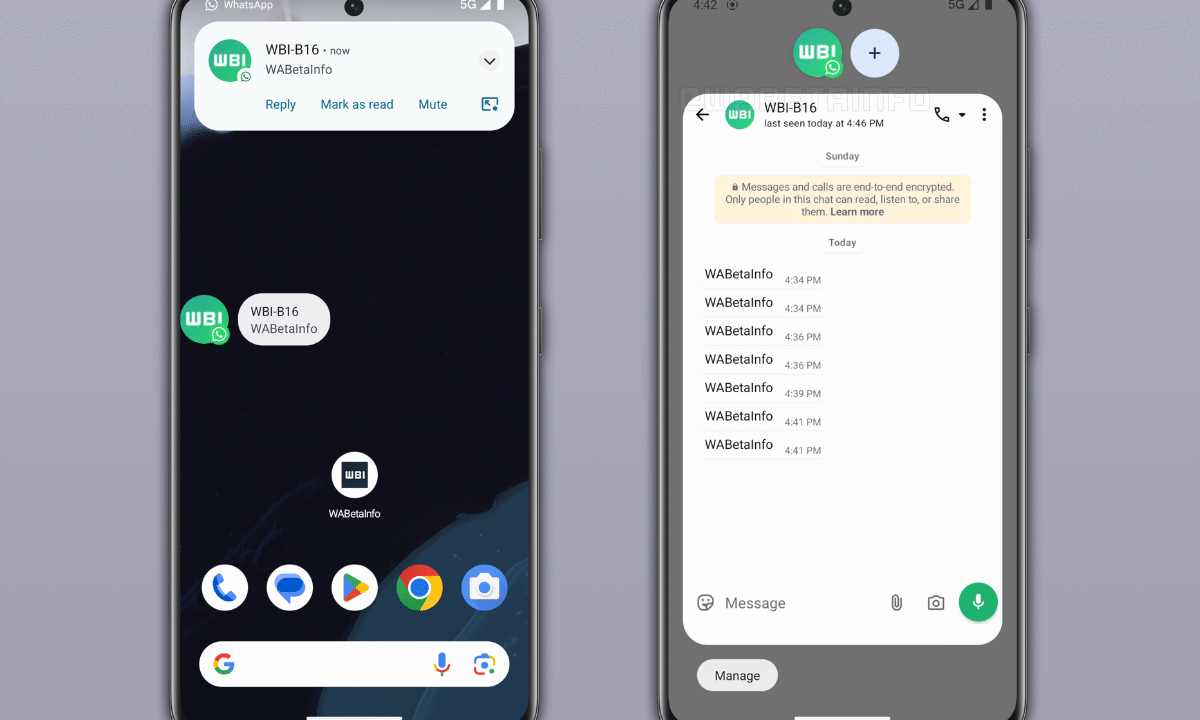
WhatsApp introduces floating notification bubbles for faster replies. Image Credit: News9Live
WhatsApp is preparing one of its most significant user interface upgrades in years, and at the center of it is the notification bubble feature, a tool designed to make messaging faster, smoother, and more intuitive.
The upcoming feature, currently in development and testing phases, is part of a broader redesign that aims to improve multitasking and user experience across Android devices. For millions of users who rely on WhatsApp daily, this update could fundamentally change how conversations happen.
What Is the WhatsApp Notification Bubble?
The WhatsApp notification bubble is a floating chat feature that allows users to reply to messages without opening the app. When a message arrives, a small circular icon, usually displaying the sender’s profile picture, appears on the screen.
By tapping the bubble, users can open a mini chat window and respond instantly, eliminating the need to switch between apps. This feature mirrors similar systems already seen in other messaging platforms and Android’s native interface.
The goal is simple: reduce friction in communication and enable real-time responses without disrupting what the user is currently doing.
How the Notification Bubble Improves Multitasking
One of the biggest advantages of the new feature is its impact on multitasking. Users can now:
- Reply to messages while watching videos
- Chat during gaming sessions
- Respond to work messages without leaving productivity apps
This makes WhatsApp more dynamic, especially for users who juggle multiple tasks on their smartphones. The feature is expected to minimize interruptions and keep conversations flowing seamlessly.
Device Compatibility and Requirements
The notification bubble feature is primarily designed for Android users. It works best on:
- Android 11 and above (optimal performance)
- Android 10 (basic support available)
Users will also have full control over the feature. Those who find floating bubbles distracting can easily disable them through system settings, ensuring a customizable user experience.
READ ALSO
WhatsApp plus is here with paid subscription feature: What users get and what stays free
Part of a Bigger WhatsApp Redesign
The notification bubble is not a standalone feature, it’s part of a broader redesign strategy. WhatsApp is also testing:
- A cleaner top bar with logo-based branding
- Channel status updates that disappear after 24 hours
- Improved navigation for a modern, clutter-free interface
These changes reflect a shift toward minimalist design and faster interactions, aligning WhatsApp with current mobile app trends.
Why WhatsApp Is Introducing This Feature Now
The push for notification bubbles comes amid growing demand for faster communication tools. With users increasingly relying on instant messaging for both personal and professional interactions, WhatsApp is evolving to stay competitive.
The feature also addresses a common frustration: constantly switching apps to reply to messages. By introducing floating chats, WhatsApp is making communication more efficient, responsive, and user-friendly.
When Will the Feature Be Available?
Currently, the notification bubble feature is in the beta testing phase. It is expected to roll out in stages:
- Beta users (testing phase)
- Gradual public release
- Full global rollout
While no official release date has been confirmed, early reports suggest it could become widely available later in 2026.
Impact on Everyday Messaging
If successfully implemented, the notification bubble could:
- Increase response speed
- Improve user engagement
- Make WhatsApp more interactive
For heavy users, especially in regions with high mobile usage like Africa and Asia, this feature could redefine how messaging fits into daily life.
FAQ
1. What is the WhatsApp notification bubble feature?
The WhatsApp notification bubble is a floating chat icon that appears on your screen when you receive a message. It allows you to open a mini chat window and reply instantly without opening the full app.
2. How does WhatsApp notification bubble work?
When a message arrives, a small bubble appears on your screen. Tapping it opens a quick reply window where you can read and respond to messages while staying in your current app.
3. Is the WhatsApp bubble feature available to everyone?
Not yet. The feature is currently in beta testing and will roll out تدريجيًا (gradually) to all users once testing is complete.
4. Which phones support WhatsApp notification bubble?
The feature works best on Android devices running Android 11 or newer, though Android 10 may offer limited support.
5. Can I turn off WhatsApp notification bubble?
Yes. Users can disable the feature in their phone’s notification or system settings if they prefer a traditional messaging experience.
6. Why is WhatsApp introducing chat bubbles?
WhatsApp aims to improve multitasking and reduce the need to switch between apps, making communication faster and more efficient.
7. Will notification bubbles affect battery life?
The impact is expected to be minimal, but since the feature runs in the background, it may slightly increase battery usage depending on usage frequency.
8. Are WhatsApp bubbles similar to Messenger chat heads?
Yes, the concept is similar to Facebook Messenger’s chat heads, offering floating conversations for quick replies.
9. When will WhatsApp release the bubble feature globally?
There is no confirmed date yet, but a wider rollout is expected after beta testing is completed in 2026.
10. Does the feature work on iPhone (iOS)?
Currently, the bubble feature is focused on Android devices. iOS may receive a different version or alternative feature in the future.