
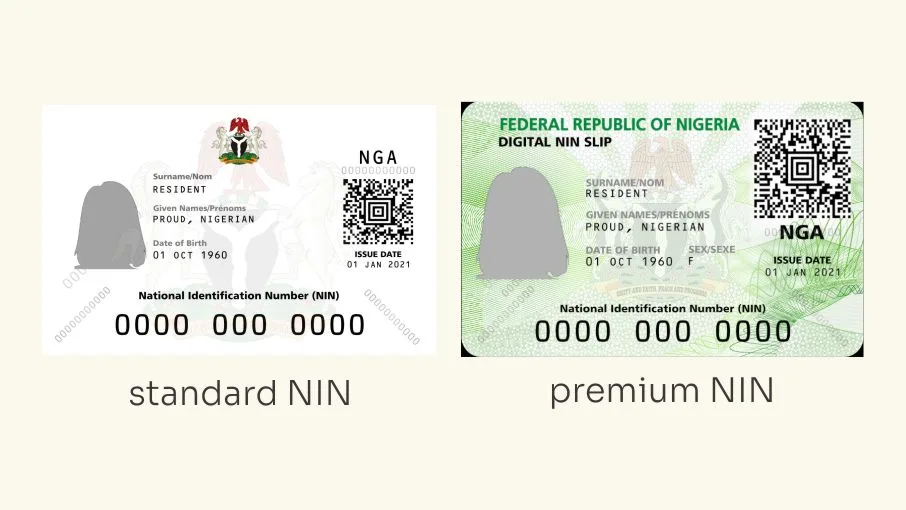
Losing the phone number you used during your National Identification Number (NIN) registration can make it difficult to retrieve your 11-digit identification number, particularly if you no longer have your NIN slip.
This is because the National Identity Management Commission (NIMC) uses the registered phone number as one of the channels through which individuals can retrieve their NIN.
For instance, Nigerians who have forgotten their NIN can dial *346# to retrieve it. However, the service is designed to work with the phone number supplied during the original registration.
If you have lost that SIM card, changed your number or no longer have access to the registered line, you may need to take additional steps to recover access to your NIN.
The good news is that losing your registered phone number does not mean losing your NIN. Your 11-digit identification number remains valid, and you can seek assistance from your network provider or NIMC to regain access.
Here is what to do if you lose the phone number linked to your NIN registration.
Can You Retrieve Your NIN Without the Phone Number Used During Registration?
Yes, but you may not be able to use the usual USSD retrieval method.
According to the Nigerian Communications Commission (NCC), individuals who have forgotten their NIN can dial *346# using the phone number they provided during their original NIN registration.
This means that if you have lost access to that number, you may not be able to complete the retrieval process through the USSD service.
In such a situation, you should visit an official NIMC enrolment centre and explain that you no longer have access to the phone number associated with your registration.
NIMC can guide you through the appropriate identity verification and record-update process.
You should not register for another NIN simply because you have lost your registered SIM card. Your existing NIN remains your permanent identification number.
What to Do If You Lose the Phone Number Used for NIN Registration
There are two main situations to consider: whether you can recover the original phone number or whether you have permanently lost access to it.
1. Recover Your Lost SIM Card From Your Network Provider
If you lost your phone or SIM card but still want to use the original phone number, contact your mobile network provider immediately.
You can visit an official MTN, Airtel, Glo or 9mobile service centre and request a SIM replacement, commonly called a SIM swap or welcome-back service.
The network provider will verify that you are the legitimate owner of the number before issuing a replacement SIM.
You may be asked to provide:
- Your phone number.
- Your NIN or another acceptable identification document.
- Your SIM pack or other evidence of ownership, where available.
- Frequently dialled numbers.
- Details of recent airtime recharge activities.
- Other information required for subscriber verification.
The exact requirements may differ between operators and depending on the circumstances of the lost SIM.
Once your original number has been successfully restored, you can insert the replacement SIM into your phone and use it to retrieve your NIN.
2. Dial *346# to Retrieve Your NIN
If your network provider successfully restores your original phone number, you can use the NIN retrieval service.
Follow these steps:
- Insert your replacement SIM card into your phone.
- Dial *346#.
- Follow the instructions displayed on your screen.
- Select the NIN retrieval option.
- Follow the prompts to receive your 11-digit NIN.
The replacement SIM must carry the same phone number you originally registered with NIMC.
A new SIM card with a different number will not automatically give you access to your existing NIN through this method.
3. Visit a NIMC Enrolment Centre If You Cannot Recover Your Old Number
If you have permanently lost access to your old phone number, you should visit an official NIMC enrolment centre.
Explain that you registered for NIN previously but no longer have access to the phone number associated with your identity record.
Take any available documents that can help establish your identity, including:
- Your NIN slip, if you still have a copy.
- A valid government-issued identification document.
- Your new phone number.
- A police report, where applicable.
- Other supporting documents requested by NIMC.
NIMC officials can guide you on verifying your existing record and updating the phone number associated with it.
Do not enrol again to obtain another NIN.
READ ALSO
NIN: Can You Have Two National Identification Numbers? What Nigerians Should Know
How to Change the Phone Number Linked to Your NIN
If you have permanently lost the phone number used during your NIN registration, you may need to update the phone number attached to your identity record.
NIMC lists phone number among the personal information that can be modified for individuals aged 16 and above.
According to the Commission’s published adult modification requirements, applicants requesting a phone number change because of loss or mechanical damage must provide a police report.
The modification process involves the following steps:
1. Obtain a police report
If you lost your registered phone number or SIM card, obtain a police report to support your application for a phone number modification.
2. Prepare your supporting documents
Take your existing NIN slip, where available, your application letter and the police report to an official NIMC enrolment centre.
You should also have your new phone number available.
3. Visit a NIMC enrolment centre
Explain that you want to update the phone number associated with your existing NIN because you no longer have access to the previous number.
4. Complete the modification form
A NIMC official will provide the appropriate data modification form. Fill in the required information and provide the supporting documents.
5. Complete the verification process
The enrolment officer will review your application and verify the information supplied. You may also be required to complete biometric verification.
6. Collect your transaction slip
After completing the process, you should receive a transaction slip as evidence of your application.
Follow NIMC’s instructions for confirming when the updated record is available.
The phone number modification does not generate a new NIN. Your existing 11-digit number remains unchanged.
Can You Link Your NIN to a New Phone Number Without Recovering the Old SIM?
Yes. You can submit your existing NIN for linkage to a new phone number through the mobile network provider’s approved channels.
The NCC provides a unified USSD code, *996#, for NIN-SIM linkage across Nigerian networks.
To link your NIN to a new SIM:
- Insert the new SIM card into your phone.
- Dial *996#.
- Follow the instructions displayed.
- Select the NIN submission or linkage option.
- Enter your existing 11-digit NIN.
- Complete the process and wait for confirmation from your network provider.
However, there is an important distinction between linking a NIN to a new SIM and updating the phone number stored in your NIMC identity record.
Submitting your NIN through *996# links your identity to the new SIM for network verification. It does not automatically mean that your registered contact number in the NIMC database has been changed.
If you want to replace the old phone number in your NIMC record, you should follow the Commission’s separate data modification procedure.
What If You Have Also Lost Your NIN Slip?
If you no longer have your NIN slip and cannot access the phone number used during registration, you can still approach NIMC for assistance.
The Commission provides a procedure for reissuing lost or damaged NIN slips.
According to its published requirements, an applicant requesting reissuance because of loss must provide:
- A recent police report.
- A court affidavit for loss of documents.
- Evidence of payment of the prescribed ₦500 fee.
- A photo identification document.
You should visit an official NIMC enrolment centre to complete the process and confirm the applicable requirements.
Remember that reissuing your NIN slip is different from registering for a new NIN. The replacement slip carries your existing identification number.
Frequently Asked Questions About Losing the Phone Number Used for NIN Registration
Can I retrieve my NIN with a new phone number?
The *346# retrieval service is intended to work with the phone number originally provided during NIN registration. If you have lost access to that number, visit NIMC for assistance with verifying your existing identity record.
What is the code to retrieve NIN without the registered phone number?
There is no alternative USSD retrieval code confirmed by the NCC for retrieving a NIN without the original registered phone number. You should contact NIMC or visit an enrolment centre.
Can I change the phone number linked to my NIN?
Yes. NIMC allows adults aged 16 and above to modify their registered phone number. Its published requirements specify a police report for phone number modification due to loss or mechanical damage.
Can I use my new SIM card to link my existing NIN?
Yes. You can submit your existing NIN through your network provider’s approved NIN-SIM linkage channels, including the unified *996# code. This is separate from changing the contact phone number in your NIMC record.
Will I get a new NIN if I change my registered phone number?
No. Changing your phone number does not change your NIN. Your existing 11-digit identification number remains the same.
Can I register for another NIN if I cannot recover my old one?
No. You are expected to have only one NIN. If you cannot retrieve your existing number, contact NIMC for assistance instead of enrolling again.
Can I retrieve my NIN if I have lost both my SIM card and NIN slip?
Yes. Visit an official NIMC enrolment centre and explain your situation. You may be required to provide identification documents and complete verification before the Commission assists you with retrieving your existing NIN.
How do I contact NIMC if I cannot access my registered phone number?
You can contact NIMC through its official customer service channels:
- Toll-free line: 08000616462
- Call centre: 0700 2255 646
- Email: [email protected]
- Official website: www.nimc.gov.ng
You can also visit a NIMC enrolment centre for assistance.