
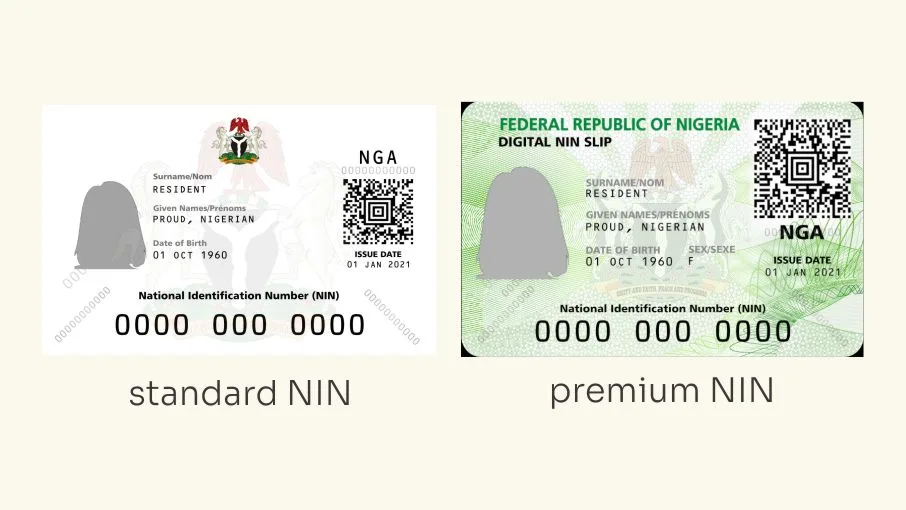
Nigerians can now download their National Identification Number (NIN) slips directly to their smartphones without visiting a National Identity Management Commission (NIMC) office or paying an agent.
The National Identity Management Commission has made the service available through its official NINAuth mobile application, allowing registered NIN holders to access and save their identity documents in PDF format.
The process is free, and users can print the downloaded document at a business centre or cybercafe whenever they need a physical copy.
NIMC explained that the downloaded slip is the same official document issued by the commission and can be used at banks, government offices and other institutions where proof of NIN is required.
How to download your NIN slip on your phone for free
NIN holders need a smartphone and access to the internet to use the NINAuth application. They must also complete the identity verification process before downloading their documents.
Here are the steps to follow:
1. Download the official NINAuth app
Visit the Google Play Store if you use an Android phone or the Apple App Store if you use an iPhone.
Search for NINAuth, download the application and install it on your device.
Users can also access the official NINAuth website at https://ninauth.nimc.gov.ng/ to find the application download options.
Make sure you download the official application to avoid exposing your personal information to fraudulent platforms.
2. Open the app and sign in
Launch NINAuth and follow the instructions to access your account.
You will need to verify your identity before accessing the services available on the platform.
Keep your registered details available and ensure your phone has an active internet connection.
3. Select the NIN Slip option
After accessing the application, look for the Do More with NINAuth section.
Select the NIN Slip option to access the document download feature.
4. Complete facial authentication
NINAuth requires users to complete a facial authentication process to confirm their identity.
Follow the instructions displayed on your phone and complete the verification.
After successful authentication, select Download NIN Slip to generate and save your official NIN document.
The slip will be available as a digital file on your phone.
READ ALSO
FG’s ₦100,000 NFSP grant: Why Nigerians with valid NIN may still miss out on payment
5. Save your NIN slip as a PDF
Once the download is complete, locate the file in your phone’s downloads folder or the destination selected by your device.
You can keep the document on your phone, send it to your email or store a backup somewhere secure for future use.
NIMC says the in-app download is free, so users do not need to pay an agent to obtain the document through this process.
How to print your NIN slip from your phone
After downloading the document, you can print it without visiting a NIMC enrolment centre.
Take the PDF file to a nearby business centre or cybercafe and ask the operator to print it.
You can also print it using a personal printer if you have one.
Before leaving the business centre, check that the document is clear and that its details and QR code are properly visible.
The NIN slip download is free, but a business centre may charge you for printing.
What about the improved plastic NIN card?
NIMC also provides digital identity services through the NINAuth application, including a digital card that allows users to access their identity information on their phones.
However, the digital card is not a replacement for the physical NIN card or slip.
The commission also recognises the improved NIN slip bearing a QR code as a valid means of identification, subject to verification through an approved resource.
Anyone interested in obtaining a physical replacement or another NIN document should check NIMC’s official service charges and payment instructions before making a payment.
Important: The claim that an improved plastic NIN card can be obtained for a flat fee of ₦1,000 through the NINAuth app is not confirmed by the official information reviewed for this report. NIMC’s published fee schedule lists different charges for specific services, including NIN slip re-issuance. Do not make payments based on unverified instructions.
What to do if you have forgotten your NIN
If you cannot remember your 11-digit National Identification Number, you can retrieve it using the phone number linked to your NIN registration.
Dial *346# and follow the instructions displayed on your phone.
The service may attract a network charge, depending on your mobile operator.
If the number linked to your registration is no longer accessible, contact NIMC through its official channels for assistance.
Frequently Asked Questions
Can I download my NIN slip from my phone for free?
Yes. NIMC allows registered NIN holders to download their official slips free of charge through the NINAuth mobile application.
Which app can I use to download my NIN slip?
You can use the official NINAuth application, available through the Google Play Store and Apple App Store.
Do I need to visit a NIMC office to download my NIN slip?
No. You can download the document directly through NINAuth after completing the required identity verification.
Is facial verification required to download a NIN slip?
Yes. The download process requires users to complete facial authentication before generating and saving the document.
Can I print my NIN slip at a cybercafe?
Yes. Download the document to your phone and take the PDF to a business centre or cybercafe for printing. The printing service may attract a fee.
Is the NINAuth app free?
NIMC provides the NIN slip download feature on NINAuth free of charge. Users should download the official application and avoid third-party platforms requesting payment for this service.
Can I retrieve my NIN if I have forgotten it?
Yes. You can dial *346# using the phone number linked to your NIN registration and follow the instructions to retrieve your number. Network charges may apply.
Is the digital NIN card the same as the physical NIN card?
No. NIMC explains that its digital card is not a replacement for the physical NIN card or slip. It provides a digital way to access and present identity information.